Self-Signed certificate
For demonstration let's create a self-signed certificate using OpenSSL. This generates both a private key and an X.509 certificate which we'll use to secure our Ingress.
openssl req -x509 -nodes -days 365 -newkey rsa:2048 -keyout tls.key -out tls.crt -subj "/CN=localhost"Kubernetes TLS Secret
Kubernetes stores certificates as Secrets. We can create a TLS Secret directly from the certificate and private key generated in the previous step.
kubectl create secret tls demo-tls --cert=tls.crt --key=tls.keyExtend Ingress to support HTTPS
Finally we extend our Ingress YAML with a TLS section referencing the secret we just created:
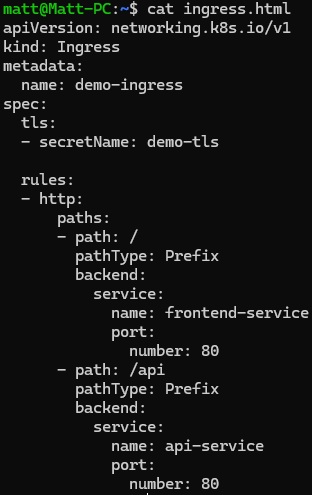
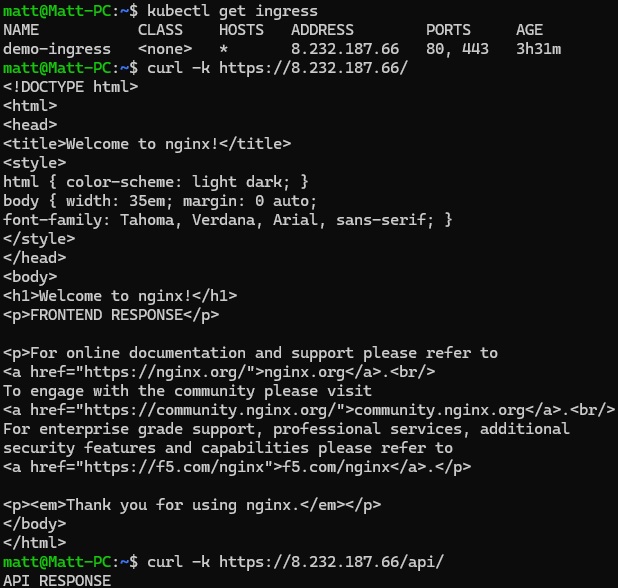
After applying the updated Ingress manifest, Google Cloud updates the existing load balancer to terminate TLS using our certificate. Since this is a self-signed certificate, we must tell curl to ignore certificate verification when testing.
Going Further
Although this demonstrates how HTTPS works with Kubernetes Ingress, manually generating, distributing and renewing certificates quickly becomes impractical. If you own a domain name you can install cert-manager using Helm and configure Let's Encrypt as your Certificate Authority. Cert-manager will automatically issue and renew trusted TLS certificates, removing the need to manually manage Kubernetes TLS Secrets.