Why do we need Ingress?
Creating a LoadBalancer service for every application means managing multiple external IP addresses and paying for multiple cloud load balancers. Instead, Kubernetes provides Ingress, which allows us to expose multiple services through a single external load balancer. GKE provides a built-in managed ingress controller, so we can simply create ingress resources and Google Cloud will automatically provision and configure the required load balancer components.
Deploying multiple services
To demonstrate Ingress routing, we will deploy and expose two separate applications. The first is an nginx container serving a frontend page, and the second is a simple HTTP echo container representing an API.

Creating an Ingress resource
We can now create a single Ingress resource that routes traffic to the correct service based on the request path.
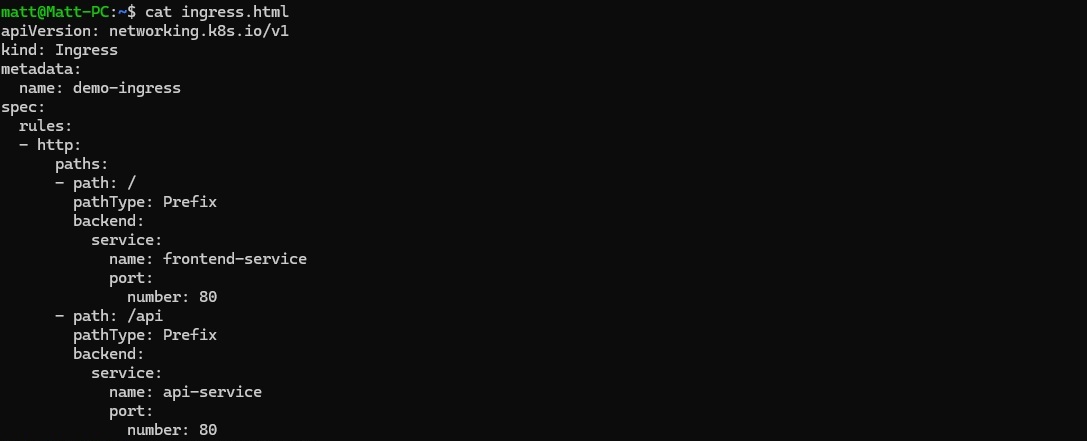
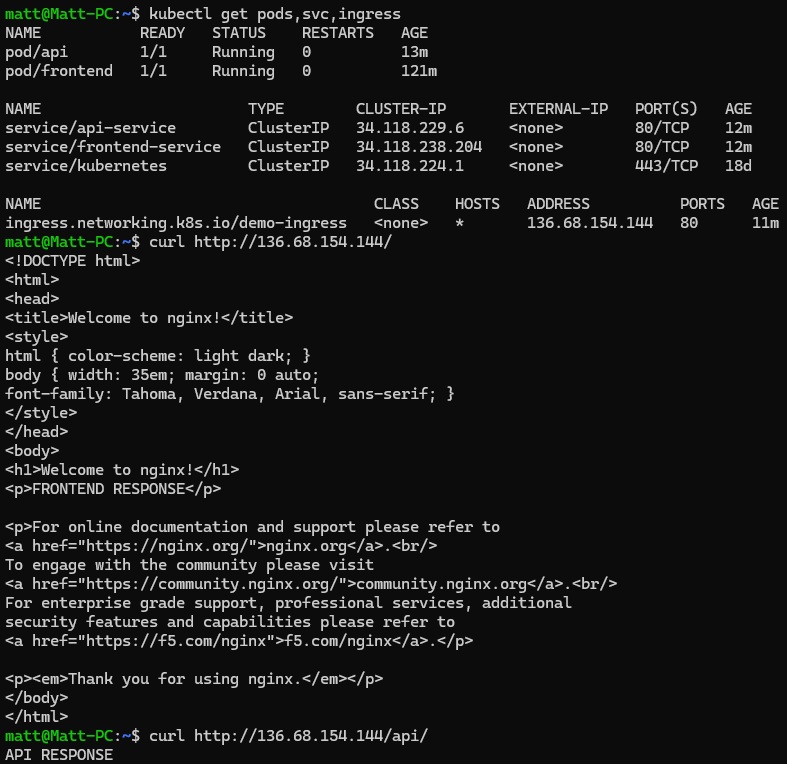
After applying this manifest, GKE provisions an external HTTP load balancer and assigns it a public IP address. We can now hit this IP and ingress will handle our application routing for us:
In the next blog post we will look at securing the ingress, since serving http routes is probably not viable for your applications. We will also look at cert-manager to automatically provision and renew TLS certificates, removing the need to manually create and manage Kubernetes TLS secrets.